For most KitchenAid stand mixers with 10 speeds, use Stir or Speed 1 to start mixing, Speed 2 for yeast dough, Speed 4 for cookies and cake batter, Speed 6 for creaming, and Speeds 8 to 10 for whipping. Always check your model’s manual before using an attachment or selecting a speed.
In American home kitchens, a KitchenAid stand mixer can help with birthday cakes, holiday cookies, homemade bread, and weeknight meals. Yet the speed lever can leave new owners guessing. Should you use Speed 2 or Speed 4? Is Speed 6 right for cake batter? The answer depends on the recipe, the mixing tool, and the result you want.
KitchenAid’s official stand mixer guidance gives a useful starting point for its 10-speed models. Low speeds suit gentle mixing, middle speeds handle many batters, and high speeds add air to cream and egg whites. One rule matters most: do not exceed Speed 2 when kneading yeast dough on models whose manuals give that limit. This guide explains the settings, common uses, and mistakes to avoid without relying on guesswork.
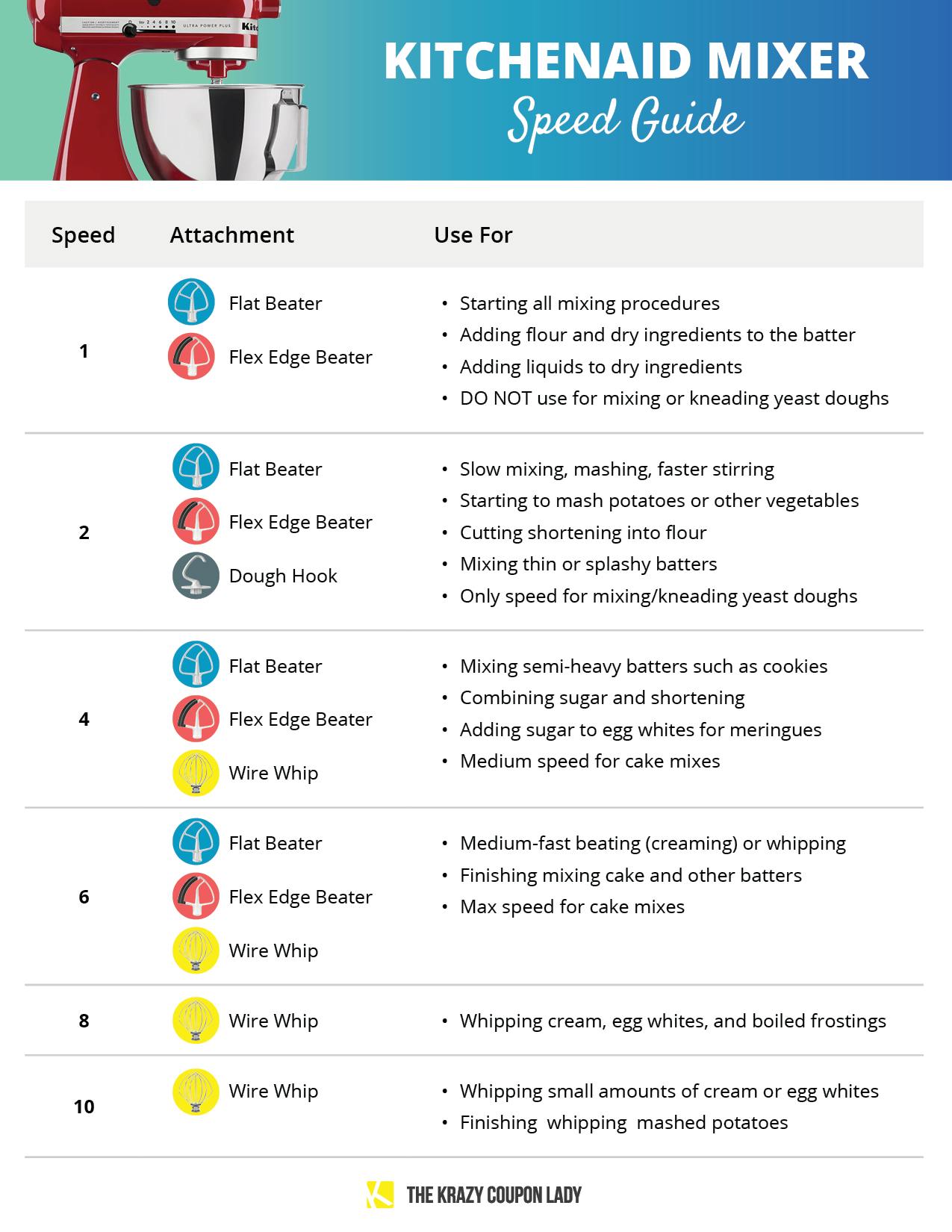
A speed chart helps you choose a setting before you begin. Most familiar KitchenAid stand mixers use a 10-speed control, with common guide settings at 1, 2, 4, 6, 8, and 10. The other numbered settings offer finer control between these main points.
Use the chart below as a starting guide for common baking jobs. Recipe instructions and your model’s owner manual take priority when they give a specific setting or limit.
Source: nl.pinterest.com
Stir or Speed 1
Use for gentle stirring, combining ingredients, and adding dry ingredients at the start of a recipe.
Speed 2
Use for slow mixing, heavy mixtures, and yeast dough kneading when permitted by the model manual.
Speed 3
Use as a fine adjustment when a recipe needs a little more movement than Speed 2.
Speed 4
Use for many cookie doughs, medium mixing, and combining butter or shortening with sugar.
Speed 5
Use as a middle setting when the recipe needs slightly more action than Speed 4.
Speed 6
Use for many creaming and beating tasks, including finishing some cake batters.
Speed 7
Use as an adjustment between medium-high and high settings when the recipe and attachment allow it.
Speed 8
Use for whipping cream, egg whites, and other mixtures that need air.
Speed 9
Use as a fine adjustment near the upper end of the range when suitable for the task.
Speed 10
Use for fast whipping or small amounts of cream and egg whites when your model and attachment instructions permit it.
What Do the Numbers on a KitchenAid Mixer Mean?
The numbers indicate the mixer‘s speed setting, not a fixed number of revolutions per minute that applies to every model. The actual motion depends on the mixer design and selected attachment. A higher number generally means faster movement, but faster is not always better.
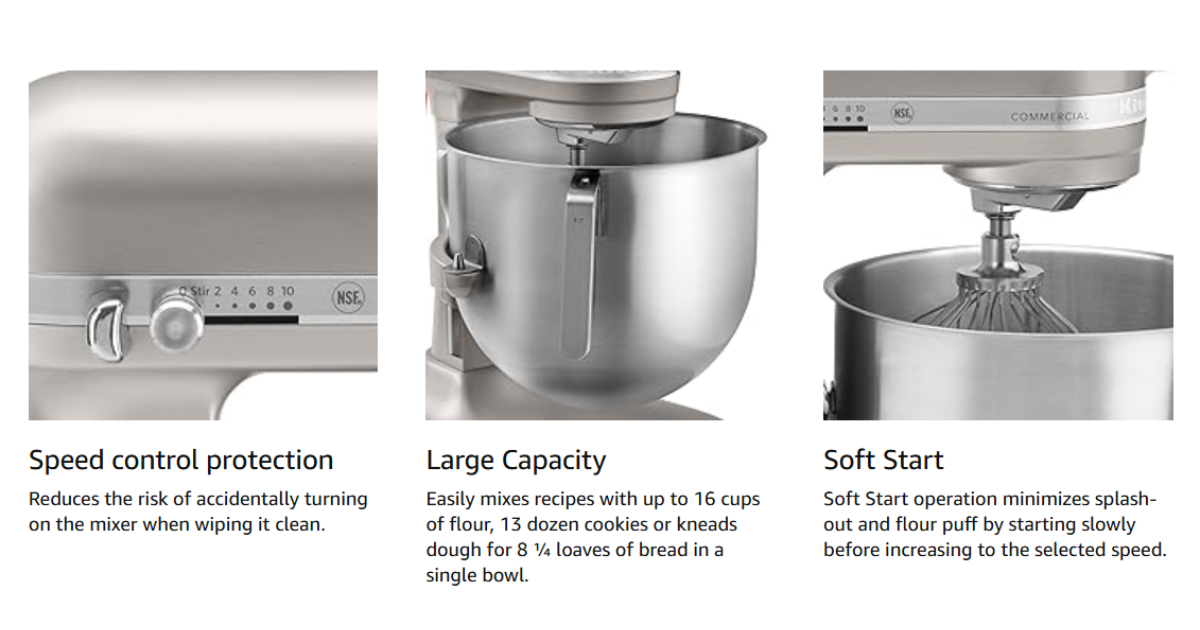
Some KitchenAid models include a special half-speed setting or other controls. Do not assume every mixer has the same range. Check the control markings and manual for your exact model.
Low speed
Helps combine ingredients without sending flour or liquid out of the bowl.
Whips air into suitable mixtures quickly, so close attention is needed.
What Speed Should You Use for Each Baking Task?
The best speed depends on what the mixture needs to do. Some recipes need gentle blending, while others need air or steady kneading. Start low, watch the mixture, and raise the setting only when the recipe calls for it.
A recipe may use more than one setting. For example, you might stir flour into a cake mixture on low before beating the batter at a higher speed. This step-by-step approach helps prevent splashes and avoids mixing more than needed.
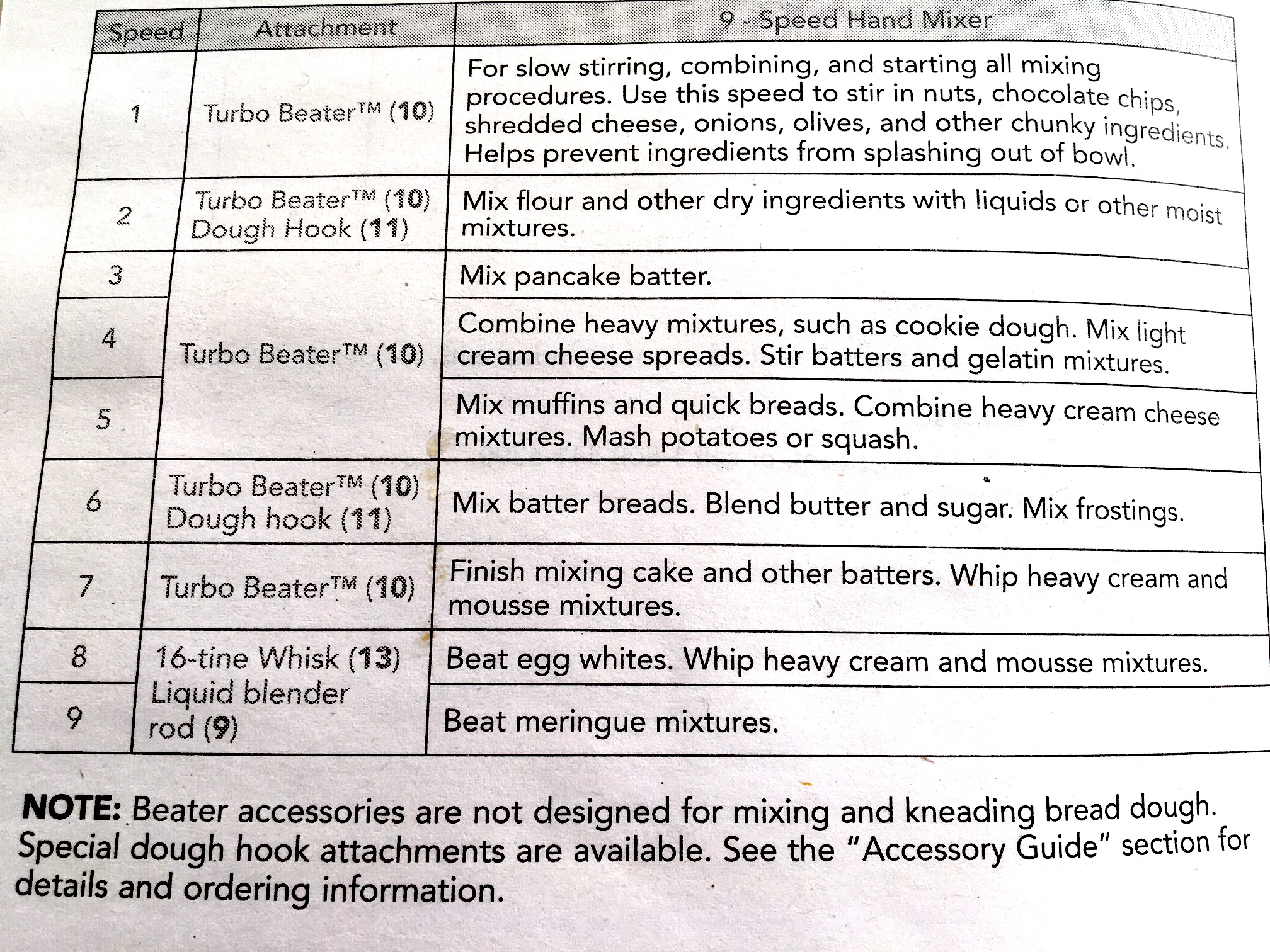
Source: storage.googleapis.com
Cake batter
Start low to combine ingredients. Use the speed and mixing time listed in the recipe, often a middle setting for blending and a higher setting for a specific finishing step.
Cookie dough
Start on low when adding flour, then use Speed 4 for many mixing tasks. Thick dough may need more time, not more speed.
Buttercream frosting
Begin slowly to mix powdered sugar with butter. Increase the speed as directed by the recipe to blend and aerate the frosting.
Whipped cream
Use the wire whip and a speed suited to whipping. Watch closely as the cream thickens, because it can turn grainy and then separate if whipped too long.
Egg whites
Use the wire whip. Follow the recipe’s steps for building foam and adding sugar, if needed, rather than jumping straight to the highest setting.
Yeast bread dough
Use the dough hook and Speed 2 on models whose manuals specify that limit. Never raise the speed beyond the stated limit to make kneading faster.
Best KitchenAid Mixer Speed for Cake Batter
For cake batter, use a low setting to blend the wet and dry ingredients at first. Speed 4 is a common setting for medium mixing, while Speed 6 may suit a recipe’s creaming or finishing step. The correct setting depends on whether you are mixing a butter cake, a sponge cake, or a boxed cake mix.
Do not beat every cake batter at high speed for a long time. Once flour is added, too much mixing can develop excess gluten and leave the cake tough or dense. Stop when the batter reaches the texture and blend described in the recipe.
For butter and sugar
Use the flat beater and a suitable creaming speed. The butter should be soft enough to mix but not melted.
For adding flour
Lower the speed to limit flour clouds and stop once the ingredients are combined.
Best Speed for Cookies and Brownies
Speed 4 is a useful starting point for many cookie recipes because it can blend butter, sugar, and other ingredients without the force of high-speed whipping. When adding flour, lower the speed first. Thick dough can strain the mixer if the batch is too large or the ingredients are too firm.
Brownie batter often needs less mixing than cookie dough. Use a low or medium setting to blend the ingredients, then stop when the batter is even. Follow the recipe if it calls for folding in chocolate chips or nuts by hand.
Avoid overmixing
Once the flour disappears into the dough or batter, check whether further mixing is actually needed.
Check batch size
Stay within the bowl and dough capacity listed for your model.
Which KitchenAid Speed Is Best for Kneading Dough?
For yeast bread dough, Speed 2 is the key setting on many KitchenAid stand mixers. KitchenAid’s published guidance warns users not to exceed Speed 2 for yeast dough because higher speeds can damage the mixer. Use the dough hook and follow the kneading time in your recipe and owner manual.
Bread dough needs steady, controlled movement to develop gluten. Turning the mixer faster is not a shortcut to better bread. If the dough climbs the hook, the mixer struggles, or the head moves more than expected, stop and check the dough amount, hydration, and setup.
Source: cleverkitchengear.com
Use the dough hook
Choose the attachment intended for yeast dough and confirm that it fits your mixer model.
Stay at Speed 2 or below
Follow the model’s documented speed limit for yeast dough. Do not use high speed to compensate for a stiff or heavy batch.
Watch the dough
Look for a more cohesive, elastic mass that follows the hook. The exact appearance varies with the flour, water, and recipe.
Check the load
Reduce the batch if the motor labors or the mixer moves abnormally. Consult the manual for maximum flour and dough capacity.
Why You Should Not Knead Yeast Dough on High Speed
High-speed kneading can place excess strain on a stand mixer that is designed to knead yeast dough at a low setting. The dough’s weight and resistance matter, so a large or stiff batch can create a heavy load even when the speed is low.
If the dough does not come together, check whether the ingredients were measured correctly and whether the recipe needs more time. Do not add flour or water at random. Small changes affect dough texture, and a recipe’s stated method is the best place to start.
If the dough looks dry
Check the recipe measurements and add liquid only as the recipe allows, in small amounts.
If the mixer slows sharply
Turn it off and inspect the load. Do not keep running a struggling mixer.
How to Choose the Right Mixer Attachment and Speed
The attachment changes how ingredients move through the bowl. A flat beater is suited to many everyday mixing jobs, a wire whip adds air, and a dough hook kneads yeast dough. Even the correct speed may give poor results if you use the wrong attachment.
Before switching tools, turn the mixer off and wait for the moving parts to stop. Make sure the attachment is fitted correctly and that it is approved for your model. Attachment instructions may set speed limits that differ from general mixing guidance.
Source: mixitbakeit.com
Flat beater
Use for many cakes, cookies, frostings, mashed potatoes, and other normal to heavy mixtures. Choose the speed based on the recipe.
Wire whip
Use for cream, egg whites, and mixtures that need air incorporated. Start as directed and watch for the desired peaks.
Dough hook
Use for yeast bread, rolls, and similar doughs. Follow the manual’s kneading speed and batch limits.
Specialty attachments
Use only compatible accessories and follow their own speed, setup, and operating-time instructions.
Can You Use the Same Speed for Every Attachment?
No. A wire whip needs enough movement to create a foam, while a dough hook works under the resistance of a heavy mass. A flat beater has its own uses and limits. The task and attachment should guide your choice rather than a single favorite speed.
Some accessories have specific speed requirements. Check the instructions supplied with the attachment before use, especially for powered accessories that connect to the mixer hub.
Match the tool to the job
Use the whisk for whipping, the flat beater for many batters, and the dough hook for yeast dough.
Check the manual
Confirm that both the attachment and its recommended setting are suitable for your mixer.
Common KitchenAid Mixer Speed Problems
Poor mixing results do not always mean the speed setting is wrong. A mixture may be too cold, too warm, too thick, or too large for the bowl. The attachment height and the recipe method can also affect how well ingredients combine.
Start with simple checks before assuming the motor or speed control has failed. Turn the mixer off and unplug it before inspecting the attachment or cleaning the bowl area. If the mixer smells burnt, sparks, or makes a new grinding sound, stop using it and seek qualified service.
Source: prudentreviews.com
Ingredients splash out
Start on Stir or a low setting, check the bowl fill level, and add ingredients in stages as the recipe directs.
Flour clouds rise from the bowl
Use the lowest suitable starting speed and add flour gradually instead of turning the mixer on at a high setting.
Butter and sugar do not cream well
Check that the butter is softened as the recipe requires. Very cold butter may stay in lumps, while melted butter will not cream in the same way.
Whipped cream stays thin
Check the cream type, temperature, attachment, and recipe method. Continue only while the cream is thickening normally.
The mixer struggles with dough
Stop the mixer and check the dough quantity, firmness, and speed. Never exceed the documented yeast dough limit.
The beater misses ingredients
Turn the mixer off before scraping the bowl. If the attachment consistently misses ingredients, consult the model’s instructions about beater-to-bowl clearance.
What If the Speed Control Does Not Work?
If the mixer will not change speed, starts and stops unexpectedly, or runs at an unusual speed, switch it off and unplug it. Check the owner’s manual for basic troubleshooting steps that apply to your model.
Do not open the motor housing or attempt electrical repairs unless you have the proper qualifications and instructions. If the control still fails after the approved checks, contact KitchenAid support or a qualified appliance repair service.
Stop using a faulty mixer
Do not keep mixing if the speed control behaves unpredictably or the machine runs in an unsafe way.
Find the model number
Use the model information to locate the correct manual and support options rather than relying on instructions for a different mixer.
Tips for Better Results With KitchenAid Mixer Speeds
A few simple habits make speed selection easier. Begin with the recipe, prepare the ingredients before switching on the mixer, and watch the mixture instead of relying on the dial alone. This helps you spot when ingredients are combined and when further mixing may do more harm than good.
Keep the work area clear and supervise the mixer while it runs. Stop the machine before scraping the bowl, adjusting an attachment, or removing ingredients. If a recipe gives a specific mixing time, use it as a guide and check the texture as you go.
Source: www.pinterest.com
Start slowly
Use Stir or a low setting when combining ingredients, especially flour, powdered sugar, and liquids.
Increase speed only when needed
Move to a faster setting when the recipe calls for more mixing or aeration, not just because the mixture looks slow.
Use the right ingredient temperature
Follow the recipe for softened butter, chilled cream, and room-temperature eggs where those details affect the result.
Avoid overmixing
Stop when the mixture reaches the texture the recipe describes. Extra mixing can make some cakes tough and whipped cream grainy.
Follow model-specific limits
Use the manual for speed restrictions, bowl capacity, compatible attachments, and recommended operating times.
How to Find the Right Speed for an Unfamiliar Recipe
If a recipe says low speed, begin around Speed 1 or 2 on a 10-speed model, unless the recipe or manual says otherwise. For medium speed, Speed 4 is a reasonable starting point for many mixing tasks. For whipping, follow the recipe’s method and use the wire whip when suitable.
Treat these settings as a practical guide, not a strict conversion for every recipe. Ingredient amounts, attachment design, and mixer model can change the result. When in doubt, check the recipe source and the manual for your specific appliance.
Low means gentle movement
Choose a low setting to combine ingredients without making a mess.
Medium means active mixing
Choose a middle setting for many batters and creaming steps when the recipe calls for it.
High means fast aeration
Use higher settings for suitable whipping tasks and watch closely as the mixture changes.
Frequently Asked Questions
Q
What is the best speed on a KitchenAid mixer for general mixing?
For many everyday mixing tasks, Speed 4 is a useful starting point on a 10-speed KitchenAid stand mixer. Start on Stir or Speed 1 when adding ingredients, then raise the speed if the recipe requires it. The right setting depends on the mixture, attachment, and model.
Q
What speed should I use to knead bread dough?
Use Speed 2 with the dough hook when your KitchenAid model’s manual specifies this setting for yeast dough. Do not exceed the documented limit. If the mixer struggles, stop and check the dough consistency and batch size instead of increasing the speed.
Q
What KitchenAid speed should I use for whipping cream?
Use the wire whip and a suitable medium-high or high setting, following your recipe and model’s instructions. Start as directed and watch the cream as it thickens. Stop when it reaches the desired peaks to avoid turning it grainy or separating it into butter and liquid.
Q
Is Speed 6 too fast for cake batter?
Not always. Speed 6 is used for some creaming and beating tasks, but it is not the right choice for every cake batter or every mixing stage. Start low when combining ingredients, follow the recipe’s method, and avoid prolonged high-speed mixing after adding flour.
Q
Can I use Speed 10 for every KitchenAid attachment?
No. Speed 10 is intended for certain fast-whipping tasks on compatible models, but other attachments may have different speed limits. Check the instructions for the exact mixer and accessory before using a high setting.
Q
Why does my KitchenAid mixer shake when kneading dough?
Some movement can occur during kneading, but unusual shaking, a moving base, or a struggling motor calls for caution. Turn the mixer off and check that it is on a stable surface and that the dough batch is within the model’s limits. If abnormal movement continues, stop using the mixer and contact qualified support.
✦ Wrapping Up
Conclusion
Learning KitchenAid mixer speeds gets easier when you match the setting to the task. Start low for gentle mixing, use Speed 4 for many cookie and batter jobs, choose suitable higher speeds for whipping, and keep yeast dough at Speed 2 when your model’s manual requires it.
The attachment, ingredient texture, batch size, and recipe all matter. A higher number does not guarantee a better result. Follow the owner’s manual, watch the mixture, and stop when you reach the texture you need.
💡 Key Takeaway
Before your next recipe, check the mixer manual, choose the correct attachment, and mark the recipe’s required speeds. Remember the main rule for many 10-speed models: start low, use Speed 2 for yeast dough, and reserve high speeds for suitable whipping tasks.