The model number on a KitchenAid stand mixer is usually on a sticker underneath its base. Unplug the mixer, place it on a soft towel, and carefully tilt it to find the label. The model number helps you identify the correct manual, replacement parts, bowl, and attachments.
In kitchens across the United States, KitchenAid stand mixers help home cooks make cookies, bread, cakes, and many other family favorites. But when a mixer needs a new bowl or repair part, its name and color are not enough. You need the exact model number to find information that matches your machine.
The good news is that you can usually find this number in a few minutes. Most KitchenAid stand mixers have an identification sticker underneath the base. This guide explains where to look, how to tell the model number from the serial number, and how to use the information when shopping for parts or seeking support.
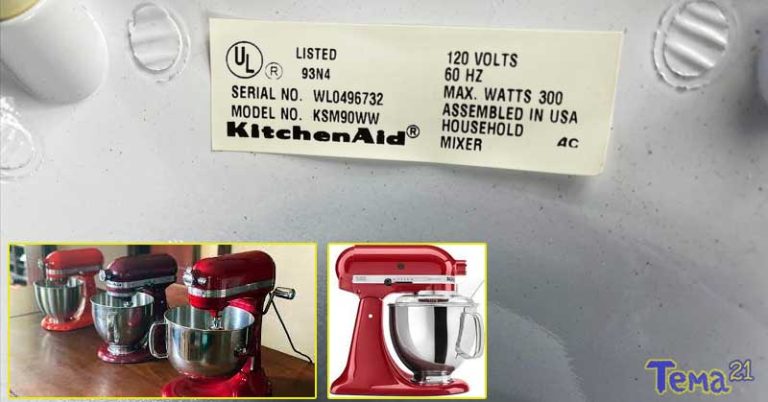
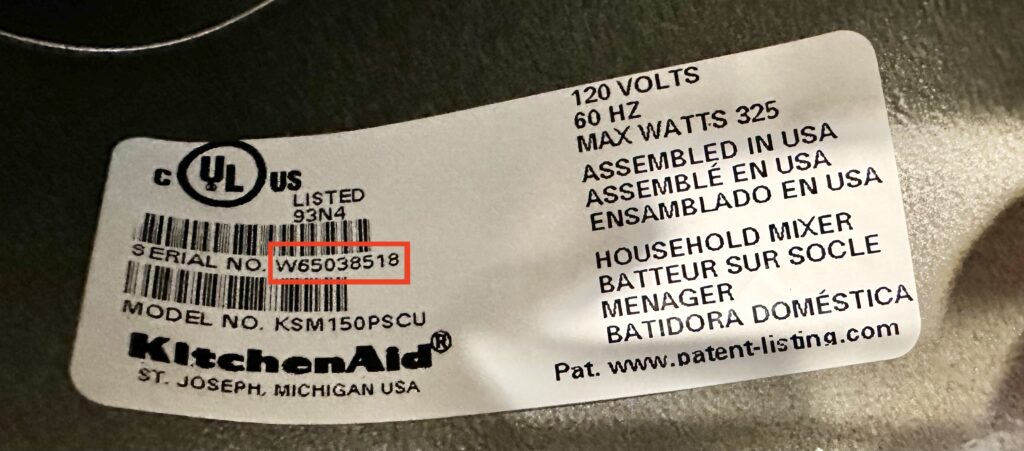
The model number on most KitchenAid stand mixers is printed on an identification sticker underneath the base. The same label usually includes the serial number and other product information. You do not need to remove the housing or take the mixer apart to find it.
Before you turn the mixer over, unplug its power cord. Place a folded towel on a stable counter, then carefully tilt the mixer so you can inspect the underside. Take care not to press against the speed control, locking lever, or other parts that could bend or break.
Look for a white or silver label. The printed details may be small, so use a flashlight and your phone camera if needed. Once you find the label, write down the full model number exactly as shown, including any letters, digits, and suffixes.
Source: momsbakingco.com
Model number
Identifies the mixer model or product configuration. Use it to find model-specific manuals, parts, and support details.
Serial number
Identifies an individual unit. KitchenAid may use it to help determine production details or review a service request.
Product label
May also include electrical ratings and other product information. Read the full label when contacting support.
How to Find the Label Without Damaging Your Mixer
Start by removing the bowl and any loose accessories. Make sure the mixer is switched off and unplugged before moving it. If the machine is heavy or awkward to handle, ask another adult to help rather than risk dropping it.
Set it on a soft, clean surface and tilt it gently. Avoid dragging the base across a hard counter. If you cannot reach the underside safely, stop and seek help instead of forcing the mixer into position.
Use good light
A flashlight can make faded printing easier to read.
Take a clear photo
Photograph the whole label so you can zoom in and keep a record of every character.
Keep the full code
Do not leave off letters or numbers at the end, since suffixes can distinguish product versions or finishes.
How to Read a KitchenAid Mixer Model Number
KitchenAid stand mixer model numbers commonly start with letters such as KSM. Some older models use other formats, including codes that begin with K. The letters and numbers help distinguish product families and configurations, but there is no single short rule that explains every model number across all production years.
For example, KSM150 is a model designation associated with certain Artisan stand mixers, while K45 appears on some older mixer models and related product information. These examples are useful clues, not a complete compatibility guide. Similar-looking codes do not prove that two mixers use the same bowl, beater, or internal part.
The complete code matters more than the first few characters. Some models have additional letters or numbers after the main designation. These may relate to a particular version, finish, market, or configuration. Check the full code in KitchenAid’s official product support resources before ordering a part.
Source: storage.googleapis.com
KSM model codes
Commonly appear on KitchenAid stand mixers, including many models in the Artisan family.
K45 model codes
Appear on certain older KitchenAid mixer models and related documentation.
Letters at the end
Can be meaningful to product identification. Record them instead of shortening the number.
Serial number
Do not mistake this longer or different-looking code for the model number when filling out a support form.
Is the Model Number the Same as the Mixer Name?
No. Artisan, Classic, and Professional are product family or series names. The model number identifies a more specific product configuration. Two mixers can share a family name yet differ in bowl capacity, head design, included accessories, or replacement-part requirements.
Color is not a reliable way to identify a mixer. KitchenAid has offered many finishes, and similar colors can appear across different models. If you inherited a mixer or bought one secondhand, check its label rather than relying on its appearance.
Series name
Provides a broad description of the product family.
Model number
Helps narrow the search to the correct model and product documents.
Color or finish
May help describe the mixer, but cannot establish parts compatibility on its own.
How to Use Your Model Number to Find the Right Manual
Once you have the full model number, use KitchenAid’s official support pages to look for the matching manual and product information. This is more reliable than choosing a manual simply because the mixer has the same color or a similar shape.
Open the KitchenAid product lookup or manuals page and enter the model number into the search field. Review the results carefully. If the exact code does not appear, check your transcription for missing characters and try the complete code again. Some older or discontinued models may require additional help from customer support.
A matching manual can explain how to assemble the mixer, use its speed settings, clean its parts, and follow the maker’s instructions. It may also list approved accessories or model-specific details that are not obvious from a store listing.
First, check every letter and digit on the sticker. A zero can look like the letter O, and small suffixes are easy to miss. Search again using the corrected model number, without assuming that a shortened version identifies the same machine.
If the search still fails, contact KitchenAid support with a photo of the label and a description of the mixer. If the label is missing, share clear photos of the whole machine and its controls. Support may be able to help narrow down the model or point you toward the correct documentation.
Check the spelling
Compare your typed entry with the original label.
Try official support
Ask for help with an older, discontinued, or hard-to-identify model.
Do not guess
Avoid downloading instructions for a similar model if the differences could affect safe operation or maintenance.
Check Bowl and Attachment Compatibility Before Buying
Your KitchenAid model number is one of the best starting points when buying a replacement bowl, beater, dough hook, or wire whip. The key is to match the part to the exact mixer type and its documented compatibility list. A product that fits one KitchenAid stand mixer may not fit another.
Start by identifying whether your mixer has a tilt-head or bowl-lift design. On a tilt-head mixer, the motor head lifts back to give access to the bowl. On a bowl-lift mixer, the bowl sits on support arms and moves up toward the mixing attachment. This visible difference can help narrow your search, but the design alone is not enough to confirm a part will fit.
Bowl capacity is another important detail. A bowl made for a larger mixer may not lock into a smaller base or sit at the correct height. Beaters and other accessories also vary in shape and size. Check the official compatibility details for the complete model number before placing an order.
Source: taftindependent.com
Replacement bowl
Confirm the bowl’s capacity, attachment method, and compatible model list.
Flat beater
Check that the beater matches your mixer style and bowl size.
Dough hook
Verify the exact model compatibility before using a replacement hook for bread dough.
Wire whip
Match the whip to the correct attachment hub and mixer configuration.
Flex-edge beater
Use the manufacturer’s compatibility list because these beaters are available in different sizes for different mixer families.
Tilt-Head Versus Bowl-Lift Models
Tilt-head and bowl-lift mixers differ in how the bowl attaches and how the mixing head moves. Those differences affect which bowls and attachments will work correctly. Two mixers with similar capacities can still need different parts.
If you are buying a used bowl or an accessory from an online marketplace, ask the seller for the part number and check it against the manufacturer’s compatibility information. Do not rely only on a statement that it fits all KitchenAid mixers.
Tilt-head
The head lifts back while the bowl remains secured to the base.
Bowl-lift
A lever raises the bowl toward the mixing attachment.
Final compatibility check
Confirm the exact mixer and accessory models before purchase or use.
Can You Find the Model Number on an Old KitchenAid Mixer?
Yes, many older KitchenAid stand mixers still have an identification label underneath the base. However, years of cleaning, storage, or regular use can make the printing fade. A used mixer may also have a damaged or missing sticker, especially if it has been handled roughly or repaired in the past.
If the label is unreadable, start with the physical design. Note whether the mixer has a tilt-head or bowl-lift system, the bowl’s approximate capacity, the shape of the speed control, and the location of the attachment hub. Take photos from the front, sides, and underside if it is safe to do so.
These details can help narrow down possible models, but they do not confirm an exact identification. Similar designs can span different product versions. Before ordering internal parts or relying on model-specific repair instructions, ask KitchenAid support or a qualified repair professional to confirm the correct model.
Source: storage.googleapis.com
Look for old paperwork
A purchase receipt, owner’s manual, warranty document, or service record may include the model number.
Check the original packaging
If it is still available, the box label may show the model information.
Take clear photos
Photograph the mixer and any remaining label details to support identification.
Contact support
Ask whether the available details are enough to identify the model or locate the correct documentation.
How to Estimate the Age of a KitchenAid Mixer
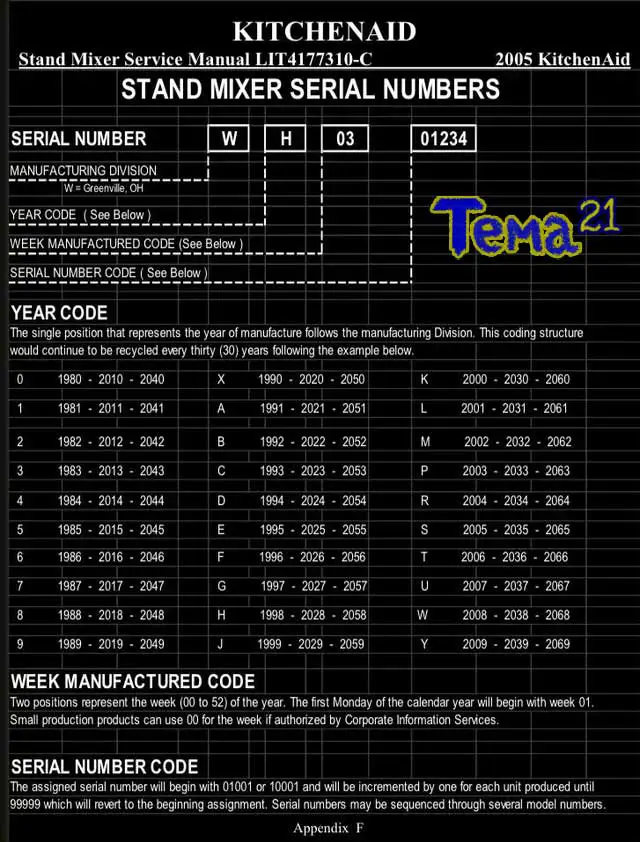
The serial number may help KitchenAid identify when a mixer was made. However, serial number formats can vary by production era, so it is best not to rely on an unverified online decoding chart as a final answer.
Keep the model number and serial number together when contacting support. The model identifies the product family or configuration, while the serial number helps distinguish the individual unit. If the sticker is missing, an exact manufacturing date may not be possible to establish from appearance alone.
Use the serial number carefully
Treat online age estimates as provisional unless they are confirmed by a reliable source.
Check service records
Past repair documents may provide useful dates or identifying information.
Avoid assumptions
A familiar design or color does not prove a specific year of manufacture.
Common Mistakes When Identifying a KitchenAid Mixer
The most common mistake is using the series name instead of the complete model number. A listing that says Artisan or Classic may describe a broad family, not the exact machine you own. A model number gives you a more useful starting point for finding the correct documentation and parts.
Another mistake is confusing the model number with the serial number. Both can appear on the same sticker, and both may be requested during a service inquiry. Write down each one separately so you can provide the right details when asked.
It is also easy to overlook letters at the end of a model code or assume that every bowl with the same capacity will fit. These shortcuts can lead to an incorrect order. Take a few extra minutes to compare the full model code with the part’s compatibility information.
Source: storage.googleapis.com
Mistake: Guessing from color
Correction: Find the label or confirm the model through reliable support information.
Mistake: Recording only part of the code
Correction: Include every letter and digit that appears in the model number.
Mistake: Treating model and serial numbers as interchangeable
Correction: Record both numbers separately and label each one.
Mistake: Assuming every accessory fits
Correction: Check the manufacturer’s compatibility details for the exact mixer and part.
Mistake: Forcing the mixer upside down
Correction: Unplug the machine, protect the finish, and ask for help if it is too heavy or awkward to move.
When Should You Contact KitchenAid Support?
Contact KitchenAid when the identification label is missing, the model number produces no reliable results, or different sources list conflicting parts. Support can also help when you need the right manual or want to confirm which accessory matches an older machine.
For US customers, the official KitchenAid Owner’s Center provides support resources and lists the customer service phone number as 1-800-344-1274. Contact options and service availability may change, so check the official website before calling. Have the model number, serial number, and a short description of your question ready.
Where can I find the model number on my KitchenAid stand mixer?
The model number is usually printed on a sticker underneath the mixer’s base. Unplug the mixer, place it on a soft towel, and carefully tilt it to inspect the label. The serial number is generally printed on the same label.
Q
What does a KitchenAid mixer model number look like?
Many KitchenAid stand mixer model numbers begin with KSM, while some older models use codes such as K45. The complete format varies by model. Record all letters and numbers, including any suffix, and confirm the code through KitchenAid’s official product resources.
Q
Can I find my KitchenAid mixer model number without the sticker?
You may be able to narrow down the model using an owner’s manual, receipt, original box, or service record. Photos of the mixer, its bowl, controls, and attachment hub can also help. However, appearance alone may not establish the exact model, so contact KitchenAid support if the identification remains uncertain.
Q
Is the KitchenAid model number the same as the serial number?
No. The model number identifies the product model or configuration, while the serial number identifies an individual unit and may help establish production details. Both numbers can be useful when requesting service, finding documentation, or checking product information.
Q
How do I know which replacement bowl fits my KitchenAid mixer?
Use the full mixer model number and check the replacement bowl’s official compatibility list. Confirm the bowl capacity and whether your mixer has a tilt-head or bowl-lift design. Do not assume that bowls with the same capacity are interchangeable.
Q
Where can I get a manual for my KitchenAid mixer?
Visit KitchenAid’s official manuals page at https://www.kitchenaid.com/service-and-support/manuals.html.html and search using your model number. You can also use the KitchenAid product lookup at https://producthelp.kitchenaid.com/Product_Lookup. If an older model does not appear, contact support for assistance.
Q
Can the serial number tell me how old my KitchenAid mixer is?
The serial number may help determine the mixer’s production period, but formats can vary across production eras. For the most reliable estimate, provide both the model and serial numbers to KitchenAid support rather than relying on an unverified decoding chart.
✦ Wrapping Up
Conclusion
Finding the model number on your KitchenAid mixer is usually simple. Start with the sticker underneath the base, and make sure the mixer is unplugged before you move it. Record the complete model number and serial number so you have the right details for manuals, replacement parts, and support.
If the sticker is damaged or missing, check your old paperwork and use photos of the mixer to help narrow down its identity. Then confirm the details with KitchenAid before buying a bowl, attachment, or repair part. A few careful checks can save you time and help you avoid ordering something that does not fit.
💡 Key Takeaway
Unplug your KitchenAid mixer, carefully inspect the label underneath its base, and save a clear photo of the complete model and serial numbers. Use the model number to search KitchenAid’s official manuals and parts resources before making a purchase.